What problem this addresses
Small and medium enterprises use industrial robots to cope with the shortage and high cost of skilled workers, but programming the robot is still a barrier. Online programming with a teach pendant needs a skilled operator, and guiding the robot along an accurate, collision-free path is not intuitive when the workpiece or the workcell is complex. Offline programming (OLP) plans the path automatically, but it relies on an accurate 3D model of the workcell and on customized software, which is costly and hard to keep up to date in a changing environment.
This led to our research question: what should a robot programming tool look like if it is to keep the advantages of both online and offline programming and support users in a complicated working environment? We hypothesized that an intuitive AR-based human-robot interface would speed up programming in such an environment and be easy to use for novices without rich experience in robot programming.
Approach
To verify this hypothesis, we built a prototype that turns the robot workcell into an AR scene (see Figure 1). The user defines a sequence of waypoints, which we call user-defined points (UDPs), and sets the position and orientation of the end-effector at each one. The UDPs go to critical regions, such as the destinations and the places where a collision is likely. The system then plans the motion between them automatically and shows the planned path and a simulation of the virtual robot in the real workcell. If the user sees a potential collision, they adjust the UDPs and the system replans, and only a collision-free path is executed on the real robot. In other words, the human makes the high-level decisions and the planner fills in the rest.
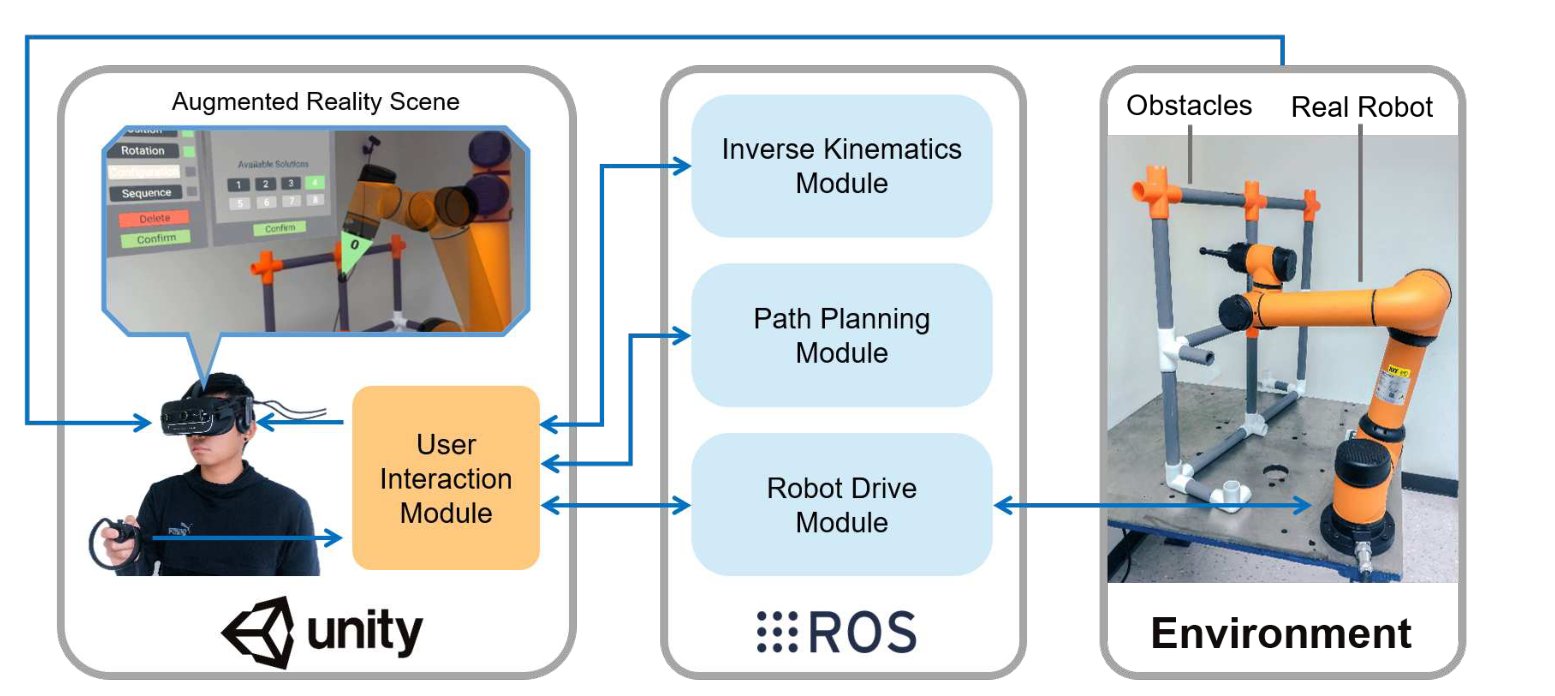
The AR headset is a video see-through setup built from an Oculus Rift and a ZED Mini stereo camera, with an Oculus Touch controller for input and two Oculus IR sensors that track the headset and controller over a 3 m × 3 m area. The robot is a 6-DOF AUBO i5 with a 3D-printed end-effector model. Unity 3D provides the AR scene and the interaction, and ROS handles inverse kinematics, path planning, and robot control, with the two connected through the ROS# SDK. To place the virtual robot exactly on the real one, we put an ArUco marker in the workcell, recorded 8 points on it with a 3D-printed calibration tool on the robot, and computed the marker’s position and rotation in the robot frame. Since the camera is mounted on the headset and both are tracked by the same sensors, this calibration only has to be done once until the sensors are moved.
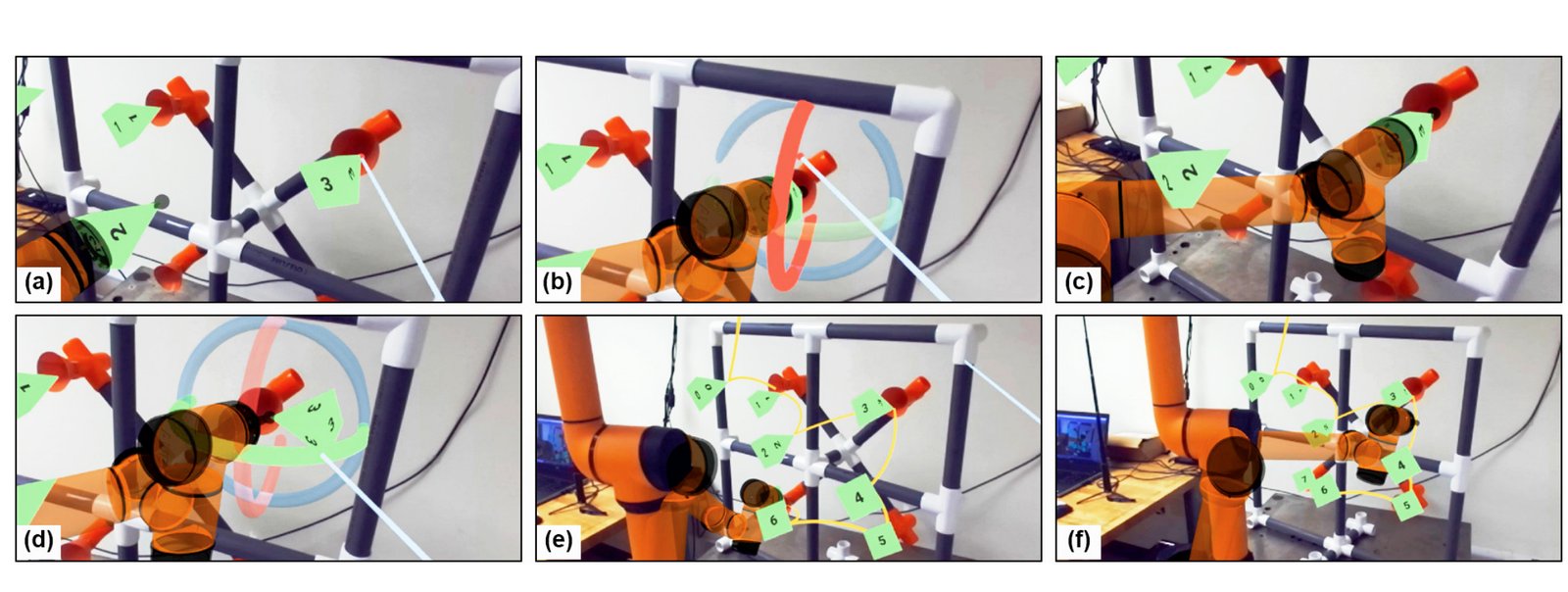
Each UDP is drawn as a labeled, inverted pyramid, and the user places and rotates it with a ray cast from the controller (see Figure 2). The ray lets the user work from a distance instead of reaching into the workcell, which could be hazardous. For each UDP, the Kinematics and Dynamics Library (KDL) solves the inverse kinematics, and the virtual robot shows the resulting configuration, occluded correctly by the real obstacles. The Open Motion Planning Library (OMPL) then plans between each pair of adjacent configurations. Since OMPL plans point to point, the robot would stop at every UDP. Therefore, we merged the joint states of all segments into one motion and re-timed it with MoveIt’s iterative parabolic time parameterization, so the robot passes through the UDPs without pausing.
Results
We tested the prototype on a path planning task with complex obstacles (see Figure 3). Four umbrella-shaped destinations sat inside a space truss structure, simulating industrial robots in vehicle manufacturing, and the robot had to visit them in sequence with a sphere-tipped end-effector. With the AR interface, we defined 8 UDPs (4 at the destinations and 4 for obstacle avoidance), checked the simulation, and executed the path on the real robot. For comparison, we programmed the same path with the teach pendant by moving the robot to the same 8 waypoints and replanning through the pendant’s OLP function. Programming took 8 min with the AR interface and 12 min with the teach pendant. Swapping the order of the second and fourth destinations took 1 min with the AR interface and 3 min with the teach pendant.
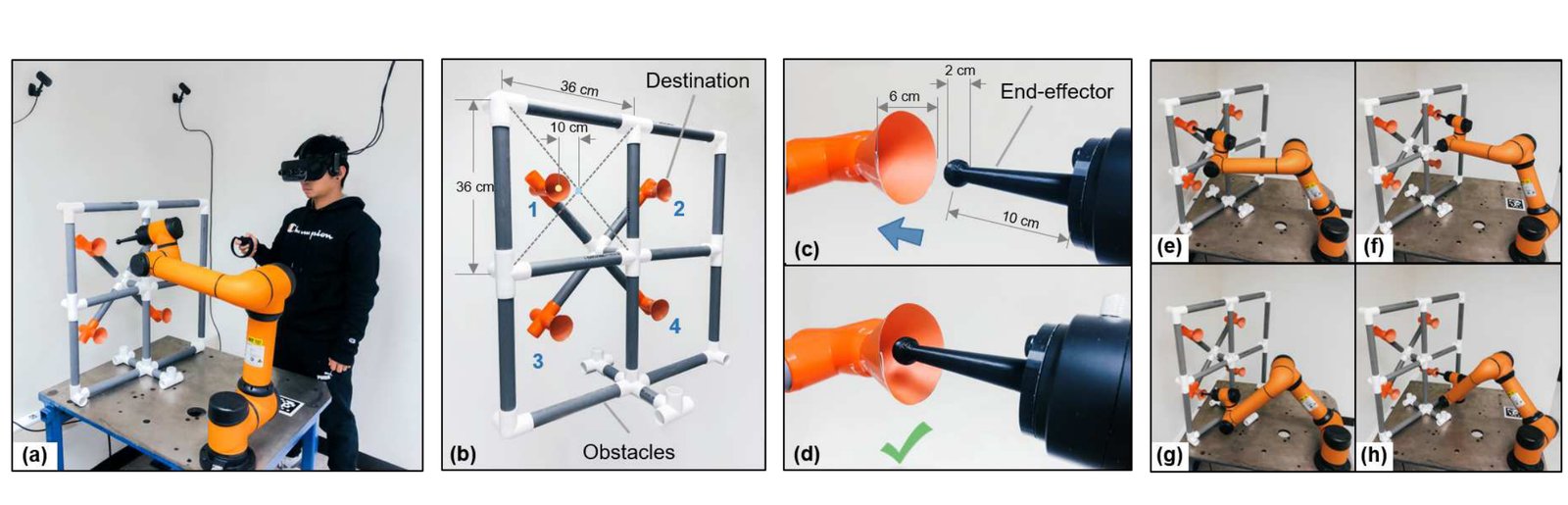
This was a preliminary verification on one use case, carried out by the authors, so it shows that the approach works rather than how much faster it is for other users.
What’s next
Two limitations came out of this work. First, defining only the position and orientation of the end-effector can still fail in a complex environment, since the inverse kinematics has several solutions and the robot configuration decides whether the path collides. Second, novices need a more user-friendly interface to keep their cognitive load low, and the claim of ease of use needs a user study with novice users, measured with the NASA Task Load Index and the System Usability Scale. Both became the focus of our next project, HAR²bot, which lets the operator choose among all robot configurations and was evaluated with 16 participants.
This work was published in the proceedings of the ASME Manufacturing Science and Engineering Conference (MSEC) 2021 (see the citation).